Student Instructions
Completion requirements
Instructions on how to use the site
14. Completing Activities
1. As you work through the course, activities can be marked as complete in two ways:
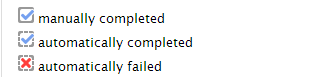
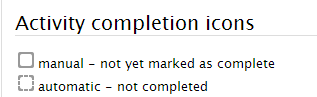
- A box with a solid border can be marked complete by the student. This shows that you have finished with this activity.
- A box with a dotted border is marked as complete automatically by the computer.
2. If you pass an automatic activity, a tick will be placed in the box. If you don't, a cross will appear in the box. You can always reattempt an activity to get red of the cross.